
Selling across multiple marketplaces has become a key growth strategy for modern ecommerce brands. Platforms, including Amazon, Shopify, eBay, and Walmart, help businesses widen brand reach, increase revenue streams, and stay competitive in a market.
However, managing products across multiple sales channels also introduces operational complexity. Each marketplace has a unique product identifier, inventory management system, product listing structure, and order workflow. A product sold under one listing ID or SKU in one marketplace may appear entirely different across platforms. These challenges faced by businesses when engaging in multichannel selling.
A brand may manage a product under an internal SKU, while the same product may have different listing IDs on sales channels. Without a system to connect these identifiers, managing inventory and orders becomes increasingly complex. Businesses struggle to log accurate inventory and provide consistent customer experiences. There are delays in processing orders because sellers have to manually check and match the internal SKU with the marketplace SKU for each order.
What Is SKU Mapping?
SKU mapping is the process of linking product identifiers across diverse sales channels, inventory systems, and fulfillment platforms so that all systems recognize the different codes as representing the same product.
SKU Mapping connects the distinct product identifiers across the marketplaces to the internal system, allowing businesses to identify when multiple listings refer to the same physical product. It allows seamless exchange of data between sales channels, inventory systems, warehouses, and fulfillment partners.
A SKU (Stock Keeping Unit) is a unique code assigned by a business to identify and track a specific product or variant. SKUs help businesses organize inventory by easily identifying details such as product type, size, color, model, or packaging through a single code.
For example:
Although these identifiers look different, they all represent the same product: a black shoe in size 10. In the absence of SKU mapping, each platform may treat these codes as representing separate products. This creates inaccurate inventory records and makes it challenging to maintain error-free stock levels across channels as SKUs get misinterpreted as different products.
Internal SKU vs Marketplace Product ID
Businesses generally have their own internal SKU framework that is created in accordance with their inventory and operational needs. These internal SKUs act as the primary source for handling products.
Marketplace product IDs, though, are created by external systems. Different selling channels use their own identification systems, very different from the brand's internal structure. For example, Amazon may use ASINs, eBay may use listing IDs, Shopify stores may use custom SKUs, etc.
SKU mapping connects these different marketplace identifiers with the business's internal SKU so that inventory synchronization, price changes, and order information flow correctly across every system.
For brands managing hundreds and thousands of products across a range of marketplaces, SKU mapping bridges a critical operational gap between accurate inventory control and efficient order fulfillment.
Why SKU Mapping Matters in Multichannel Ecommerce
As businesses start selling on diverse channels, logging product details and managing products manually becomes increasingly difficult. The same product may appear across different channels, each with different inventory records and order processes. SKU mapping helps businesses maintain consistency by creating a unified recognition of products across all channels.
1. Accurate Inventory Management
Inventory accuracy is one of the biggest roadblocks for businesses dealing in multichannel ecommerce. When marketplaces are not connected properly, stock levels may be reflected inaccurately on different channels.
For example, if a product sells on Amazon but the inventory system does not recognize its connection with Shopify’s listing, available product stock will not update correctly.
With SKU mapping, all connected listings reflect information from a single inventory source, improving stock accuracy hence reducing overselling risks.
2. Faster Order Processing
When orders arrive from multiple marketplaces, brands must quickly identify the ordered product, its warehouse location, and the required fulfillment process. Mapped SKUs allow systems to automatically identify products and direct orders correctly, reducing manual verification and processing time.
3. Better Customer Experience
Inaccurate inventory information can lead to canceled orders, delayed shipments, and disappointed customers. By coordinating different product IDs with each other across channels, SKU mapping helps businesses provide reliable in-stock or out-of-stock information and frictionless fulfillment experiences.
Common Challenges Without Proper SKU Mapping
Without proper SKU mapping, multichannel sellers often experience operational challenges that affect efficiency, brand value, and customer trust.
1. Inventory Becomes Inaccurate
When the same product exists under different IDs, systems may treat each listing as a separate item. This creates scattered inventory records. A product may appear available in one marketplace even though the entire inventory is already sold out through another channel.
2. Orders Sync Incorrectly
The very foundation of Order management systems lies in accurate product identification. If SKUs do not align, orders may not sync correctly and may require manual intervention. This slows fulfillment and increases instances of mistakes.
3. Overselling and Stockouts
Overselling happens when businesses sell out-of-stock products.
For example, a customer purchases an item on one marketplace, and the product becomes out of stock. But that inventory reduction is not updated on the other marketplace, which still shows the product as being in stock. A second customer can purchase the same item that is actually out of stock.
SKU mapping helps prevent stockout situations by connecting marketplace listings to a shared inventory record.
4. Wrong Products Get Updated
Incorrect SKU mapping can cause brands to update the wrong product details. This can negatively impact sales performance and customer trust.
5. Inconsistent Pricing
When products are not properly mapped, their prices may not get updated in all marketplace listings. This can result in different prices for the same product across the different sales channels.
How SKU Mapping Works Across Multiple Marketplaces
SKU mapping involves creating relationships between a brand's own product records and marketplace listings. The process usually includes:
1. Identifying Product Records
Businesses first identify all product details in their systems, including internal SKUs, marketplace product listings, warehouse codes, and fulfillment details.
2. Creating SKU Relationships
Each product identifier in each marketplace is connected to the corresponding internal SKU.
Suppose, Internal SKU: LAPTOP-BAG-BLK
This SKU is linked to Mapped Listings:
3. Establishing a Central Inventory Source
Once products are mapped, inventory updates can be monitored from a single reference point. When a product is sold on one marketplace, the inventory change is automatically reflected across all other connected platforms.
4. Automating Synchronization
Automation ensures that product information, inventory levels, and order details stay consistent across marketplaces. This minimizes manual work, optimizes efficiency, and improves operational accuracy.
Best Practices for Clean SKU Management
Maintaining an organized SKU dataset is central to successful multichannel selling. Some key features to consider while aiming for clean SKU management are:
- Create a Consistent SKU Structure - Businesses must use a standard naming system that clearly identifies product features such as category, size, color, and variants.
- Maintain a Master Product Database - A centralized product database helps businesses update product information using one reliable source.
- Avoid Duplicate SKUs - Duplicate SKUs can create confusion and lead to incorrect inventory updates.
- Regularly Audit SKU Mappings - As businesses add new products and marketplaces, SKU relationships should be reviewed regularly to ensure accuracy.
- Automate Where Possible - Manual SKU management becomes difficult as product catalogs grow. Automation tools reduce errors and improve efficiency by maintaining accurate connections between systems.
How MapMyChannel Simplifies SKU Mapping
MapMyChannel helps businesses integrate sales channels, inventory systems, ERPs, and fulfillment operators through centralized ecommerce management. The platform facilitates SKU mapping between sales channels and ERP systems, allowing businesses to sync product information, orders, and inventory easily and automatically.
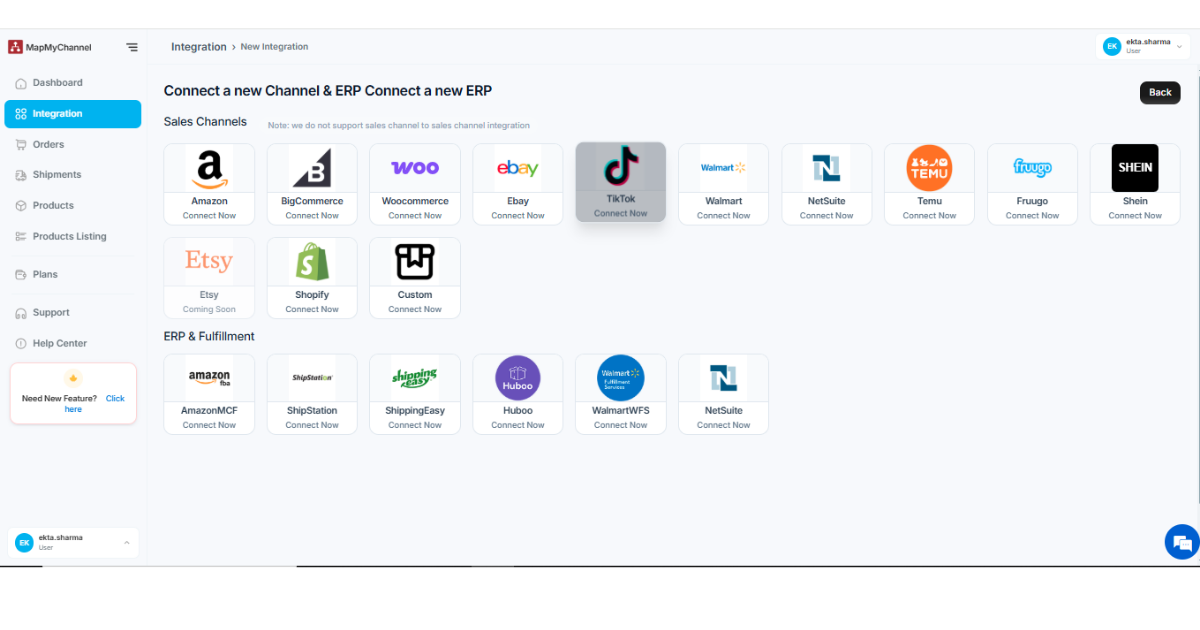
Step 1: Connect Your Sales Channels and ERP
Start by connecting your sales channel to preferred fulfillment partners and ERP systems. Once connected, all data is brought into a centralized dashboard.
Step 2: Access the SKU Mapping Dashboard
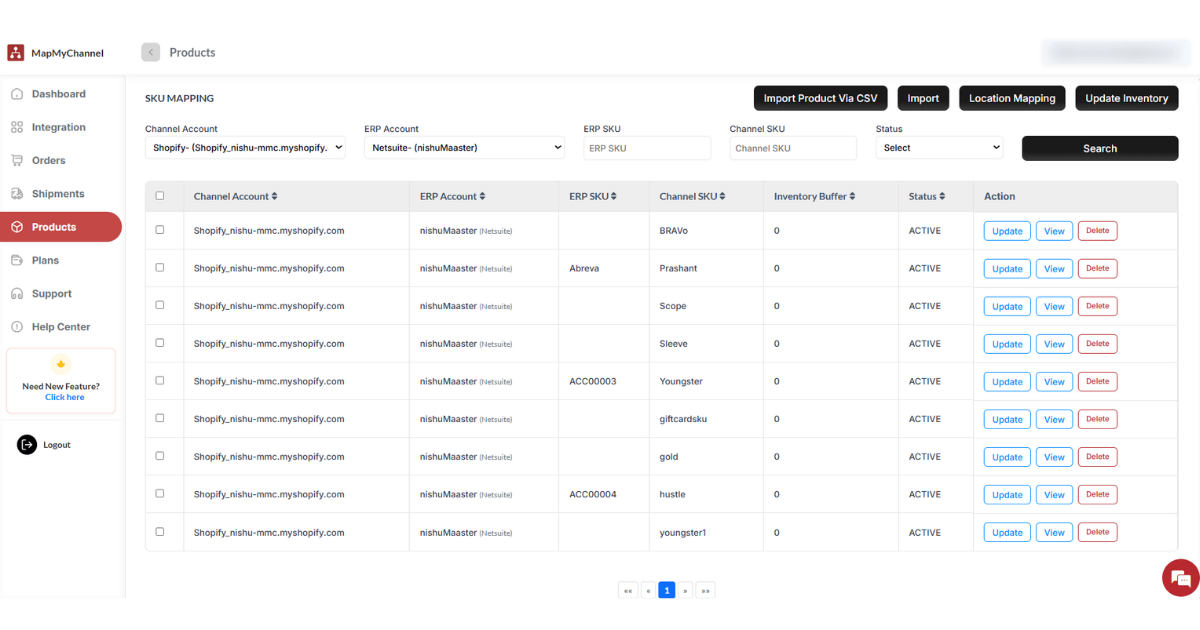
After integration, navigate to the Products → SKU Mapping page in the MapMyChannel (MMC) app, where you can view all products mapped between the selected sales channel and ERP account.
On the product overview page, you can:
- Create, edit, or delete SKU mappings so that orders and inventory sync correctly between the channel and ERP.
- Import Products via CSV: This allows you to import products in bulk via CSV file inside the MapMyChannel (MMC) app.
- Import product: This button lets you import all your products automatically in case of missing products.
- Location Mapping: This option helps you to choose a location for the inventory update.
- Update Inventory: This button allows you to manually update the inventory if there is an issue with automatic inventory updating within the app.
Step 3: Review and Manage SKU Mappings
Each row reflects a specific product SKU mapped between the channel SKU and the ERP SKU. You can create new mappings, update existing ones, view mapping details, or remove outdated SKU mappings to ensure accurate synchronization between the sales channel and ERP.
Step 4: Configure Bundle SKUs and Inventory Settings
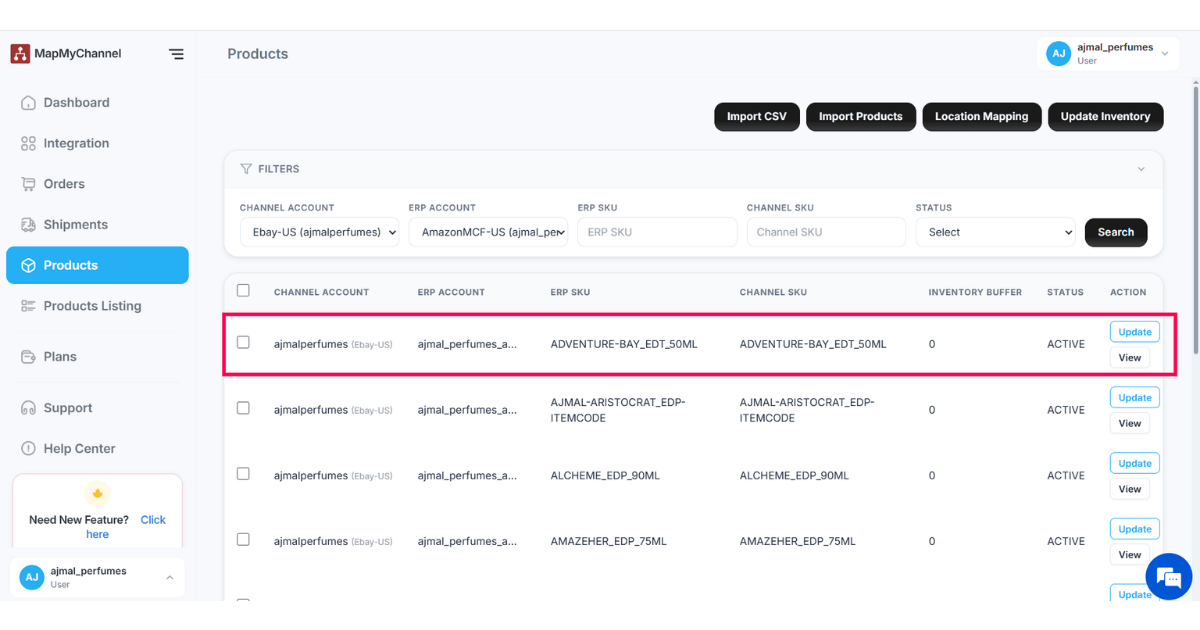
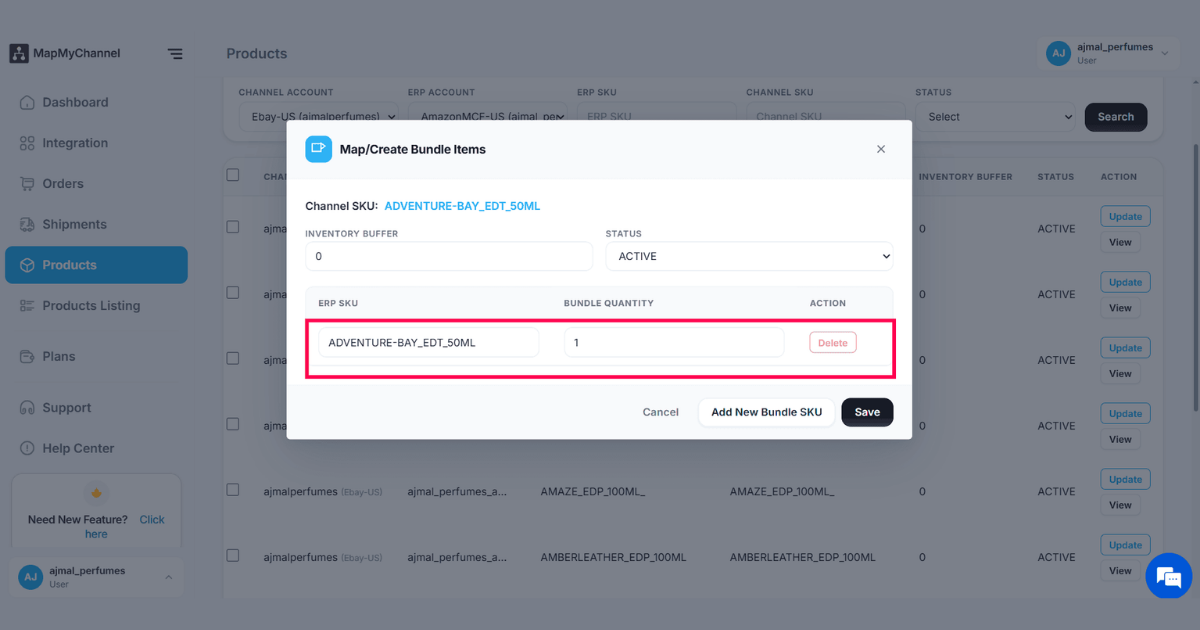
MapMyChannel also supports bundle SKU mapping, allowing you to assign ERP SKUs, define bundle quantities, and configure inventory buffers.
A product bundle is a setting that defines how many units of the ERP SKU will be shipped when one unit of the channel SKU is ordered (for example, 1 channel SKU → 3 units of ERP SKU).
Conclusion
Multichannel ecommerce provides brands with significant growth opportunities, but managing products across a range of marketplaces requires accurate data coordination. SKU mapping enables the internal inventory systems to connect with marketplace listings, allowing businesses to maintain accurate inventory levels, automate processes, and deliver improved shopping experiences. For growing ecommerce brands, investing in a reliable SKU mapping strategy is critical for building efficient, scalable, and customer-centered operations.
FAQs
What does SKU mean?
SKU translates into Stock Keeping Unit. It is a unique identification code assigned to a specific product or item, which assists brands in tracking that specific product's inventory, sales, and stock levels.
Why is SKU Mapping Necessary?
SKU mapping is a competitive necessity in the eCommerce sphere today. It has risen to prominence because it connects product listings across multiple sales channels and ensures error-free inventory tracking. Challenges of overselling or incorrect order fulfillment are easily overcome. Brands can optimize stock management, improve order fulfillment, and make better business decisions through SKU mapping.
How do I create an SKU for my product?
To create an SKU for your product, assign a logical alphanumeric code using key product attributes such as brand, category, color, size, or model. Arrange these details in a broad-to-specific order and separate them with hyphens. Keep the format consistent, readable, and unique for every product variation to ensure accurate inventory tracking and easier order management.
Are SKUs different across marketplaces?
Yes, SKUs can be different across marketplaces because each channel has its own product identifiers, listing structure, and inventory management system. SKU mapping is required to connect these different product codes to the brand's single internal SKU. This allows businesses to manage stock accurately across the different platforms on which they sell. This helps prevent inventory mismatches, overselling, and order processing errors.
What is the difference between a Product ID and a SKU?
SKU mapping and product listing IDs are related but differ in their purposes. A product listing ID identifies a product listing on a specific platform. It is created and controlled by the marketplace. A SKU identifies the product from the brand's inventory.
Get in Touch

.webp)

.webp)


