
Introduction
Shoppers don’t just limit themselves to a single marketplace to buy what they want. They might find a product through an Instagram post, then search for the best price on Amazon, before finally buying from a retailer that offers the product on a Shopify store. For sellers that sell online, this presents a real opportunity to increase sales - but it requires more work. Without integration, managing product listings, inventory, orders, and shipping for each channel becomes difficult to track and time-consuming.
Shopify multichannel integration works to address this by streamlining these activities. By integrating a Shopify online store with marketplaces, social media, and other channels, businesses can synchronize data between systems to avoid duplicate data entry, support more efficient operations, and manage sales channels from a central dashboard.
What Is Shopify Multichannel Integration?
Shopify Multichannel Integration connects a Shopify store to different sales channels where consumers can search for or purchase items. The platforms can be Amazon, Facebook, eBay, Instagram, Walmart, Google Shopping, or in-store using Shopify POS.
It allows sellers to synchronize data between Shopify and connected channels rather than managing data separately. Product details can be imported into sales channels while orders, inventory, and fulfillment details are imported into a shared workflow at the same time.
This is where multichannel integration becomes useful. It connects Shopify to multiple sales channels and a 3PL fulfillment partner so sellers do not need to update manual entries across different channels. Some connections are available through Shopify, but different marketplaces may require third-party integration tools.
Why Do Shopify Sellers Need Multichannel Integration?
Shopify Multichannel integration helps businesses to reach customers who wouldn’t normally visit your Shopify store. For example, you are an electronics business, so you can sell on your Shopify store while selling on Amazon, Etsy, eBay, Instagram, or social commerce platforms.
For businesses, managing orders manually across the different channels becomes difficult as order volume grows. This process can lead to inventory discrepancies, stockouts, and fulfillment errors.
Shopify multichannel integration connects these channels and helps synchronize key data through a centralized workflow. This allows sellers to:
- Reach consumers widely across relevant sales channels
- Reduce manual data errors around product and inventory management
- Centralize order management into a consistent workflow
- Improve Inventory visibility
- Reduce errors of overselling
- Streamline order management process
- Monitor channel performance more efficiently
For example, a home décor business receiving 30 orders per day from Amazon, Shopify, and Instagram needs to check multiple dashboards to track orders. With a connected setup, the orders can be viewed and processed into a consistent workflow. The aim is to sell where the target audience already shops, while keeping daily operations manageable.
What Can Be Synced Between Shopify and Sales Channels?
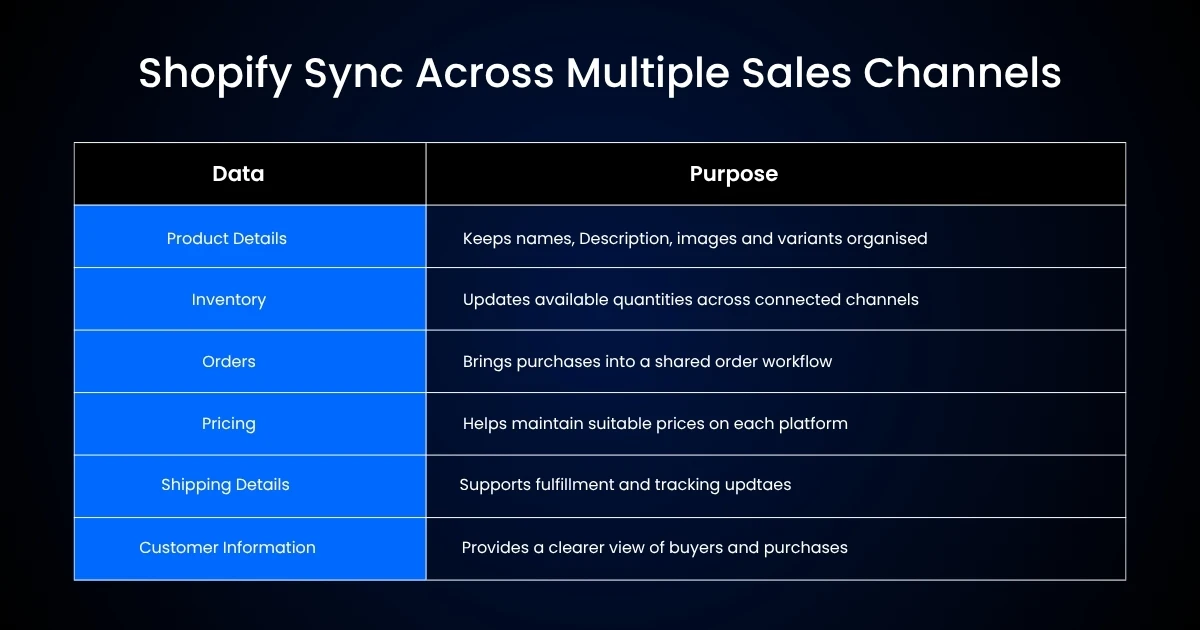
Shopify multichannel integration synchronizes key business data between your store and connected sales channels. Depending on the platform you are using, this can include many areas, though the most common areas that sellers look for updates on include:
1. Product Data
It can also be used to sync product information such as title, description, images, and more between platforms, though each platform follows a different framework. For example, one system’s product title might need to be cut or rearranged for use in another ecommerce environment.
2. Inventory
Keeps stock levels synchronized across channels, helping prevent risk of overselling and ensuring each platform reflects relevant inventory updates and real-time inventory.
For Example- If you have 40 coffee makers, and 10 are sold on Shopify and 5 on Amazon, you don’t want each platform to display an inventory of 25.
3. Order Data
After an order is confirmed on one ecommerce platform, it needs to transfer to the correct fulfillment workflow. This information can then be sent back to the customer, informing them of shipping dates.
4. Pricing
Ensures pricing consistency across channels while enabling channel-specific pricing when necessary across different marketplaces.
5. Shipping Details
Syncs shipping methods, carrier details, shipping and tracking details, and delivery information between your connected sales channels to facilitate accurate status management.
6. Customer Information
Syncs necessary customer and order information to ensure both of your connected systems have the correct information available for order management, customer communication, and delivery management.
What Are the Challenges of Shopify Multichannel Integration?
Connecting multiple sales channels can simplify ecommerce operations; however, it can create new areas for sellers to oversee.
1. Overselling
Delayed, inaccurate, or failed inventory updates can cause a product to appear available after it has already been sold on another channel. This can be the reason for order cancellations, overselling, and negative customer feedback.
2. Product Differences
The channels have their own categories, image guidelines, title limitations, or product attributes. The sellers can’t copy the same information; they have to adapt their product info for each specific marketplace.
3. Pricing
Every marketplace can charge different platform fees and selling costs, so sellers may have to set channel-based prices on individual channels in order to protect profit margin.
4. Order Fulfillment
There are always different shipping rules or return processes for the available channels, which have to be analyzed beforehand.
5. Order Fulfillment Complexity
Different sales channels may have different shipping rules or return processes, so sellers need to make sure that the order is synchronized correctly.
6. Different Apps Complexity
If two apps are supposed to manage the same inventory, they may cause conflicts. In general, it is easier to use limited apps and not many different ones.
Let’s say an electronics seller is using Shopify to manage all products while adjusting item category, photo specifications, and description for Amazon and eBay. The core information stays accurate, but each listing is prepared for its specific channel.
So good planning has more value than the sheer amount of channel connections.
How to Set Up Shopify Multichannel Integration
Integrating multiple selling channels to a Shopify store goes beyond merely adding more points of sale. Success relies on a structured approach and strategy, aiming to utilize Shopify as the central platform that facilitates the distribution of all its products across numerous additional touchpoints:
1. Preparing Your Shopify Store
First, prepare your store by ensuring all your products are perfectly cataloged. Each listing should include accurate product names, descriptions, images, prices, variations, SKUs, and available quantities. This information will be distributed amongst the chosen sales channels, so perfection is required.
2. Choose the Right Sales Channels
Identify the desired sales channels by considering customer demographics, the products you sell, and where your targeted customers generally shop.
An online Etsy store, for example, could choose to integrate its products into the website, and the platform could push this information over to its Instagram, Facebook pages, and Google Marketplace. An electronics retail website could try Amazon, Walmart, and Google Shopping.
3. Connecting the Channels
Connect your Shopify store and supported marketplaces using Shopify integration options or a multichannel eCommerce integration platform. Once connected, information regarding products, inventory, sales, shipping information, etc can be synced.
4. Map Products and SKUs
Map Shopify products and SKUs on different channels. Not every Shopify product in the inventory needs to be showcased on every channel. Make product, pricing and description decisions based on where the seller places them.
For example, a $30 item on a Shopify store might become $33 due to the added fees of the specific marketplace. You might want to show all the products, or you might not.
5. Configuring Inventory Sync
Sellers need to choose how inventory levels should be synchronized. Merchants choose to show every inventory quantity across sales channels or selectively place products; all that is important is to use inventory buffer rules for selected marketplaces. This enables the business to avoid overselling products in the retail space.
6. Test Synchronization
If it is a fresh integration, sellers must adequately test each of the integrated systems so that they can verify the accuracy of product listings, quick processing of sales, etc. Businesses can launch live integration to allow test purchases. These purchases help assess inventory updates, processing, and shipping capabilities.
7. Monitor and Optimize
By understanding and analyzing data on which products perform well on each channel (Amazon, Etsy, Facebook marketplace, etc.), as well as the traffic and number of orders that are being made, you’ll be able to optimize your efforts. You can shift where you are investing and push the channels giving you the greatest results.
Common Shopify Multichannel Integration Mistakes to Avoid
Even a well-integrated setup can be defeated by a bad setup. A few mistakes can complicate operations significantly.
- Using inconsistent SKUs: Using different SKUs for the same product might lead to incorrect product mapping and inventory updates. Maintain a SKU mapping across marketplaces.
- Overlaunching channels: The more sales channels, the more listings, inventory rules, customer messages, and fulfillment needs to manage. It is better to start with a few relevant channels and expand once established.
- Copying product listings without review: Product details may differ as per marketplace. For instance, check title, category, images, specifications, and description.
- Ignoring Inventory rules: Sellers should determine how inventory is allocated until they start to sell. Otherwise, inventory can be quickly exhausted from one platform while others display outdated stocks.
- Lacking shipping & return policy: Different marketplaces might have different rules. Build these workflows into an order fulfillment process.
- Using redundant applications: Multiple platforms can create conflict with each other if they control the same data. The choice of multichannel integration system should depend on the objective of the operation.
- Not measuring performance: Automation can cut down manual work; however, sellers need to monitor synchronization and identify errors. An occasional check for errors can avoid huge issues down the line.
Conclusion
Shopify Multichannel Integration enables sellers to manage products, inventory, orders, and fulfillment across many channels while minimizing manual effort. Multichannel ecommerce integration can work well if there is a single source of truth for data, well-defined inventory policies, and suitable business channels. A strategic approach beginning by publishing products to a few logical channels provides a cautious growth method. With a strong foundation, Shopify is a helpful tool for multichannel ecommerce growth.
Get in Touch

.webp)

.webp)


