
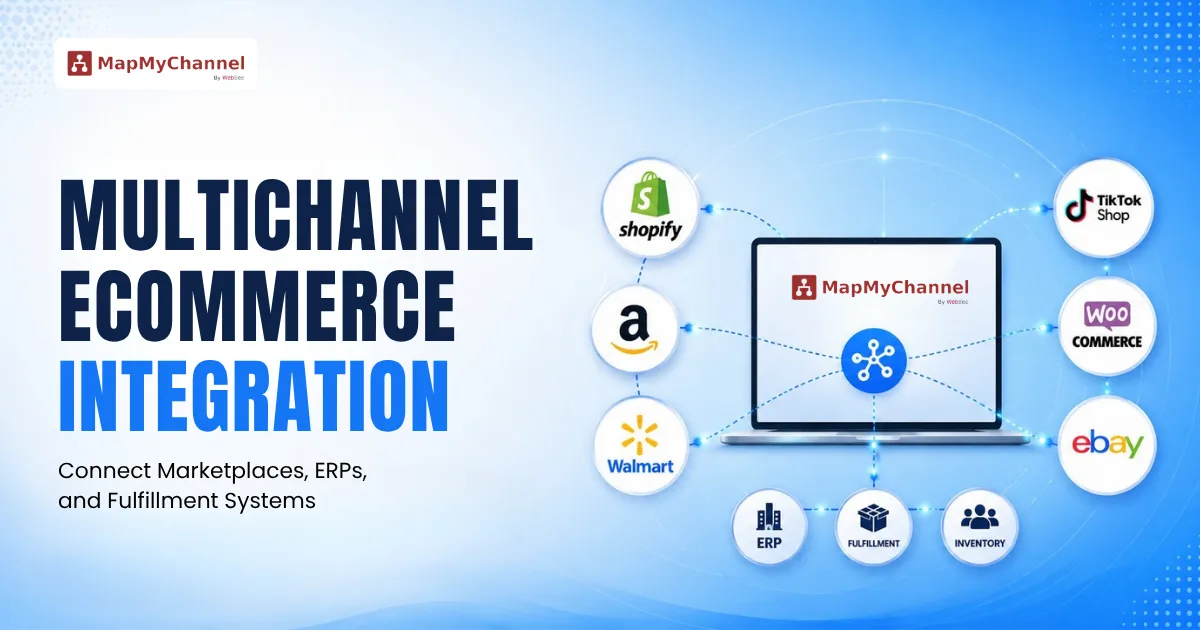
What Is Multichannel eCommerce Integration?
To understand Multi-channel ecommerce integration, we need first to understand what multichannel ecommerce is. It is a business model in which products are sold across multiple online and offline channels to expand a business’s reach and reduce reliance on a single marketplace.
Multichannel ecommerce businesses connect all marketplaces, online stores, and fulfillment partners so that the inventory and orders stay in sync across every channel. This is called Multichannel ecommerce integration.
Instead of manually entering on every channel, multichannel ecommerce integration keeps the inventory, orders, listings, and pricing on a single dashboard.
Difference Between Multi-Channel And Omnichannel E-Commerce
Core Components of a Multichannel Integration Ecosystem
1. Marketplace Integration
Marketplace integration connects your business with online marketplaces, namely, Amazon, eBay, Walmart, Etsy, and Target Plus. It automatically syncs product listings, stock levels, pricing, and orders across sales channels from one dashboard.
This eliminates the need for repetitive manual updates, reduces overselling, and enables businesses to manage multiple marketplaces optimally while expanding their consumer reach.
2. Shopping Cart Integration
Shopping cart integration connects your store's shopping cart and checkout system with your inventory, payment gateways, CRM, and many other business tools. As customers place orders, data flows automatically between the integrated systems, guaranteeing error-free order processing, protected payments, and a user-friendly purchasing experience.
3. RP Integration
Here, your retail operations are connected with your business's core systems such as inventory, finance, procurement, accounting, etc. Through instant data syncing, ERP integration eliminates repetitive data entry, enhances operational transparency, and helps businesses make data-backed decisions while upscaling across many more channels.
4. Fulfillment Partner Integration
Fulfillment partner integration connects your company with your preferred fulfillment network. This network is usually made up of in-house fulfillment, 3PL providers, or other fulfillment services. Orders are automatically transferred to the relevant fulfillment center for picking, packing, shipping, inventory updates, and tracking.
How Multichannel Integration Works
- Customer places an order from Amazon, Shopify, Walmart, or a connected sales channel. The order data enters a centralized integration workflow.
- The Integration Platform receives the real-time order, which helps to reduce manual entry and ensures every system receives consistent information.
- After order confirmation, inventory data is automatically updated across the connected sales channels, which helps to avoid stockout situations.
- The order details are transferred to the ERP System for financial processing, accounting, inventory, and reporting,
- The order is routed to the fulfillment partner, whether it is an in-house warehouse, a 3PL provider, or other fulfillment services.
- Once the order is shipped, shipping details and tracking information are automatically synced across the connected sales channels.
- After the fulfillment process, inventory levels and order statuses are synchronized across marketplaces, ecommerce stores, ERP systems, and fulfillment partners. This provides real-time data and improves e-commerce operations.
How to Set Up Multichannel Integration Using MapMyChannel
By following a structured setup process, businesses can connect their online and offline stores, marketplaces, inventory systems, and fulfillment channels to ensure smooth data flow and a centrally managed system of products, orders, and inventory:
Step 1: Create Your MapMyChannel Account
Sign up and set up your MapMyChannel (MMC) account. Configure your business details, store information, and integration preferences to prep the platform for connecting your sales channels.
Step 2: Connect Your Ecommerce Store
Integrate the ecommerce platform (such as Shopify, WooCommerce, Magento, or other supported platforms) your brand's store exists on, with MMC by entering the required store credentials or API details.
Step 3: Connect Marketplace Channels
Add and authorize your preferred marketplaces, such as Amazon, eBay, Walmart, or other sales channels. Enter the required marketplace account details and grant MMC access permissions to establish the connection.
Step 4: Configure Product Data Mapping
Map your product SKUs between your ecommerce store and connected marketplaces. Match product attributes, categories, pricing, and other required fields to ensure an error-free product sync.
Step 5: Sync and Publish Products
Once mapping is complete, sync your product collection from your primary store to selected marketplaces. Review product information and publish listings across all connected channels.
Step 6: Configure Inventory and Order Settings
Set up inventory rules, stock syncing preferences, order management, and fulfillment settings to ensure smooth data transfer between your store, marketplaces, and operational systems.
Step 7: Test the Integration
Run test synchronizations to ensure that products, inventory, orders, and updates are flowing accurately between MapMyChannel and connected channels.
Step 8: Go Live and Monitor Performance
Activate the integration and start managing your multichannel operations through MapMyChannel. Monitor product updates, inventory levels, orders, and channel performance regularly to ensure accurate and smooth operations.
Choosing the Right Multichannel Integration Platform
Choosing the right multichannel integration platform is crucial for optimizing operations, supporting consistency across different channels, and supporting sustainable business growth. When evaluating a solution, consider the following capabilities:
- Comprehensive Channel Integrations: The platform should seamlessly connect your ecommerce store with online marketplaces, social commerce platforms, ERP systems, and other essential business applications. This ensures smooth data flow across your entire business ecosystem.
- Real-Time Inventory and Order Management: Pick a platform that updates inventory and orders across all connected channels instantly. This reduces stock mismatches, prevents overselling, and ensures precise order fulfillment.
- Intelligent Workflow Automation: Repetitive tasks such as product listing updates, pricing sync, inventory adjustments, transfer of order data, shipping notifications, and returns management should be automated to reduce manual effort.
- Centralized Management Dashboard: Managing products, inventory, orders, etc from one dashboard simplifies business operations. A centralized dashboard enables businesses to respond quickly to changing business needs.
- Advanced Analytics and Reporting: A robust platform should deliver thorough insights into sales performance, inventory and demand trends, and channel effectiveness. These data-led findings help in clearly identifying growth opportunities and making informed business expansion decisions.
How MapMyChannel Simplifies Multichannel Integration
Managing multiple sales channels can become very complex without the right integration software. MapMyChannel simplifies multichannel integration by aggregating your ecommerce operations on a single, user-friendly platform, allowing businesses to manage products, inventory, orders, and fulfillment from one source.
MapMyChannel seamlessly integrates leading marketplaces, ecommerce platforms, ERP systems, and shipping providers. This allows it to manage product listings, inventory data, pricing, and order data in real time. This eliminates the need for manual updates, thereby saving time by reducing operational workload. It also helps prevent overselling, which protects the brand from SLA breaches and optimizes every customer's shopping experience with consistency.
With centralized analytics and performance insights, businesses can track sales, inventory, and channel performance from a unified interface, making data-informed decisions with confidence.
Whether you, as a brand, are expanding to new marketplaces or expanding already existing operations, MapMyChannel provides the adaptability, automation, and transparency needed to refine multichannel integration while delivering a uniform shopping experience across all touchpoints.
Conclusion
The e-commerce market is continuously evolving, and selling across multiple channels is necessary to stay competitive and relevant to consumer expectations and preferences. However, this business model is, by itself, no longer sufficient—these different channels must come together to work seamlessly.
Multichannel ecommerce integration eliminates operational silos by connecting systems within a brand ecosystem. This e-commerce solution transforms disconnected channels into a unified network. This not only improves the efficiency of ecommerce operations but also empowers brands to deliver consistent shopping experiences, adapt quickly to changing market demands, and expand without hesitation and ambiguity. By investing in the right integration platform, businesses can simplify complexity, unlock new growth opportunities, and build a resilient ecommerce operation for the future
Frequently Asked Questions
1. What is multichannel ecommerce integration?
Multichannel ecommerce integration connects multiple sales channels- online stores, marketplaces, ERP, and fulfillment systems, to one platform to manage products, update inventory, process orders, and analyze customer data efficiently.
2. How does ERP integration improve ecommerce operations?
ERP integration automates data flow between ecommerce, inventory, finance, and operations. This improves accuracy, reduces manual workload, and provides real-time insight into business performance. There's an overall improvement in Ecommerce operations through faster order processing and better inventory management.
3. Why is real-time inventory synchronization important?
Real time inventory synchronization keeps inventory up to date across all channels through automatic updation of inventory fluctuations. This minimizes instances of overselling, stockouts, and inaccurate data on product availability.
4. How do fulfillment integrations reduce order errors?
Fulfillment integrations automate order transfers, shipping updates, and inventory tracking. This reduces order errors that may be caused by manual entry and improves accuracy.
Get in Touch

.webp)
.webp)


