

Introduction
Today, Amazon is considered one of the most competitive e-commerce platforms, and thus competitiveness demands efficient order management for scaling up one's business. Customer order management includes much more than receiving orders; it needs reliable inventory tracking, order processing, order fulfillment, and return management.
When a business expands to multiple platforms, the manual processes become too complicated to manage. Amazon order management system automates workflows and synchronizes inventory to improve operational efficiency.
This guide explores Amazon order management, its importance, the full order management cycle, the challenges, and how to choose the best software.
What Is Amazon Order Management?
Amazon order management refers to the processes that occur after a customer places an order at Amazon. The activities include order entry, inventory verification, order processing and fulfillment, shipping, tracking, returns, etc.
For sellers at Amazon Marketplace, effective order management involves the coordination of different workflows within their business, namely:
- Amazon Marketplace orders
- Inventory
- Warehouses
- Order fulfillment
- Shipping
- Customer service
Manual order management becomes prone to errors and time-consuming for sellers as order volume rises. They might encounter challenges such as incorrect inventory levels, delayed shipping, and poor customer communication.
By using Amazon order management software, such bottlenecks become easy to manage. Amazon order management software integrates different workflows into a single streamlined operation. This way, sellers can manage all orders from a central system.
The Amazon Order Management Lifecycle
A typical Amazon order workflow generally includes the following stages:
Example
A seller gets 200 Amazon orders in a promotional campaign. With a manual process, the seller must:
- Export orders individually.
- Manage inventory manually.
- Coordinate shipping info separately.
- Encounter possible errors that will delay order fulfillment.
With automated Amazon order management, sellers can:
- Import orders immediately.
- Update inventory automatically.
- Get real-time information for fulfillment.
- Synchronize tracking details.
It provides an opportunity to concentrate more on product development and customer relations rather than on routine.
Why is Amazon order management important?
Efficient order management positively impacts customer experience, sellers' productivity, and scalability of business. Amazon sellers expect timely delivery, fast shipping, and accurate tracking. All of these require efficient operations management in the e-commerce space powered by robust management systems.
According to Amazon’s annual reports, the company continues to operate one of the world’s largest e-commerce ecosystems, generating hundreds of billions of dollars in annual sales. As marketplace competition increases, sellers need efficient order management processes to improve fulfillment speed and operational efficiency.
Emarketer's e-commerce forecasts for 2025 prove that the global e-commerce sector continues to develop, creating additional pressure on online stores to increase the efficiency of their operations.
Benefits of Efficient Amazon Order Management
1. Accurate Inventory Management
Inventory management is a major roadblock faced by e-commerce sellers when expanding business. If stock levels are not updated, a business may sell unavailable products accidentally, termed as overselling. Amazon inventory management tools will help sellers manage stock synchronization accurately between Amazon Marketplace, E-commerce platforms, warehouses, and fulfillment centers.
This will prevent over-selling and help sellers keep track of available products.
2. Faster Order Processing
Amazon clientele expects fast and reliable deliveries. Amazon is held to very high standards of order fulfillment. Efficient order processing allows sellers to receive orders immediately, limit manual intervention and related errors, receive quicker access to shipping details, and improve order fulfillment.
Faster order processing ensures customer satisfaction and an enhanced shopping experience.
3. Fulfillment Management
Order fulfillment is a critical component of any customer's brand experience. Brands must carefully choose a fulfillment management channel, which in turn decides where their products will be stored, packed, and shipped. There are several popular fulfillment solutions:
A carefully thought-out choice of fulfillment solution is key to achieving the right trade-off between cost, control, and scalability.
4. Better Multichannel Sales
Many ecommerce businesses have a multichannel sales strategy that includes selling products on Amazon, Shopify, Walmart, and their own website. Separate management of each channel makes operations more complicated than they need to be.
The benefits of the multichannel order management system include:
- Order visibility
- Inventory sync
- Automated updates
- Simplified reports
Thus, a multichannel OMS allows businesses to grow without making operations more complex.
5. Enhanced Customer Experience
A good customer experience begins with a robust order management system. A reliable order management system enhances delivery accuracy, delivery status visibility, return process, and response time.
A seamless post-purchase experience retains customers and motivates brand loyalty.
Manual vs Automated Amazon Order Management
Many businesses operating at a small scale begin with manual processes. They may use spreadsheets, Seller Central reports, and separate tools to track orders. However, as sales increase, these methods become inefficient. Find below the challenges that surface with Manual Order Management, when brands upscale:
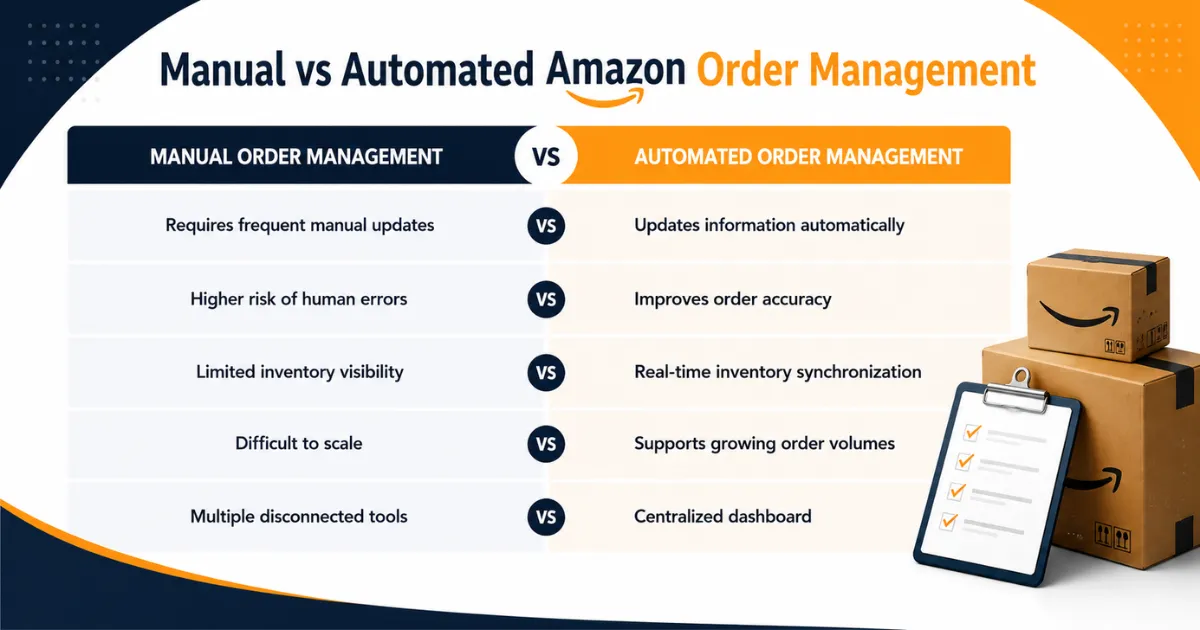
The Role of Automation in Amazon Order Management
Automation has become an integral part of ecommerce business operations. Sellers no longer need to tie up productive human capital in completing repetitive tasks and can simply line up these tasks to be completed automatically through Amazon Order Management. Ecommerce businesses can now automate Amazon orders by connecting the systems and platforms below through Amazon OMS:
- Amazon Marketplace
- Inventory system
- Warehouse management system
- Shipping services
- 3PL services
Amazon Order Management: Step-by-Step Process
The order management flow is designed such that all orders go through a predetermined process starting from purchasing confirmation and ending at order delivery. Regardless of the order fulfillment strategy (Amazon FBA, FBM, or combined strategy) is chosen by the seller, each step must be precise, visible, and coordinated.
Step 1: Order Placement and Validation
When customers purchase a product on Amazon, they receive a list of order information:
- Product information
- Number of units ordered
- Shipping address for a customer
- Confirmation of payment
- Delivery options
In case the business processes a few orders, manual order management is possible. However, growing businesses still need some kind of integration between Amazon and order fulfillment processes.
Example:
An online seller of consumer electronics receives 1,500 orders on Amazon Prime Day. Without an automatic system:
- The orders will be validated manually.
- The fulfillment team will get delayed information about orders.
- Delivery will be hard to manage.
With a proper order management system on Amazon:
- Orders are captured right after placement.
- Inventory availability will be checked automatically.
- Orders will be fulfilled without any unnecessary delays.
Step 2: Inventory Management and Sync
After order placement, the system first checks for product availability. Inventory accuracy is an important aspect of Amazon seller order management. Wrong information leads to problems of:
- Over-selling
- Cancellations of the orders
- Delayed deliveries
- Poor customers' feedback
A proper order management system keeps stock information current in all selling channels.
Example:
A fashion trader sells products through Amazon, Shopify, and a physical store. A customer purchases the last available jacket on Amazon. An integrated inventory system immediately updates stock levels across all channels, preventing another customer from purchasing unavailable inventory.
Step 3: Order Processing and Routing
Once inventory is confirmed, the order processing begins. An automated order processing system determines the best fulfillment method based on:
- Warehouse location
- Customer location
- Shipping requirements
- Inventory availability
- Delivery deadlines
Order routing ensures products are shipped from the best-suited location. This flexibility allows sellers to reduce costs while maintaining fast delivery.
For example:
- A product stored in an Amazon fulfillment center may use FBA.
- A high-value product stored in a private warehouse may use FBM.
- A product sold through another website may use Amazon MCF.
Step 4: Picking, Packing, and Shipping
In the fulfillment stage, products are prepped for shipping. Depending on the seller’s business model, fulfillment may happen through any one or a combination of the channels given below:
- Amazon fulfillment centers
- Seller warehouses
- Third-party logistics providers (3PLs)
Sellers with high order volumes can significantly reduce fulfillment delays by integrating a warehouse with 3PL providers. A streamlined Amazon order fulfillment process includes the following stages:
Step 5: Shipment Tracking and Notifications
Customers expect accurate delivery updates after the order is shipped. Automated systems sync shipping confirmations, tracking numbers, delivery and order status updates.
There is enhanced visibility and transparency for both the brand and the customers. Customer service requests decrease in number by providing customers with real-time order updates. A synchronized order management system on Amazon guarantees providing customers with accurate information throughout the delivery process.
Step 6: Manage Returns and Refunds
Ecommerce businesses should consider returns as well. A poorly executed returns process increases costs and reduces customer satisfaction. An optimal returns workflow manages refund processing, inventory adjustments, and timely customer communication.
Although returns do occur after the purchase, a hassle-free post-purchase process helps to maintain customer loyalty.
Common Issues in Amazon's Order Management
1. Managing Increasing Order Volumes
The efficiency of manual order handling decreases with the business's expansion. High-volume sellers often struggle with:
- Processing hundreds of orders daily.
- Maintaining accurate inventory.
- Coordinating multiple fulfillment locations.
Solution - Automation tools streamline order processing by reducing the need for manual intervention in completing routine repetitive tasks.
2. Preventing Inventory Errors
Inventory discrepancies can adversely impact a brand's reputation and result in increased operational expenses. Common causes for inventory errors include:
- Manual spreadsheet updates.
- Multiple sales channels.
- Poor inventory visibility.
Solution: Real-time inventory synchronization and automation ensure that accurate stock levels are maintained.
3. Managing Multiple Fulfillment Methods
Depending on the product and business requirements, numerous sellers utilize different fulfillment methods. The process of handling Amazon FBA, FBM, and Amazon MCF fulfillment is not always smooth sailing.
Solution: The solution to such bottlenecks is connecting all fulfillment channels to one dashboard through an Order Management System.
4. Lack of Operational Visibility
Sellers may find it challenging to understand delayed orders, inventory location, and best-performing products without centralized reporting. The evolution of expenses associated with fulfillment.
Solution: Require the use of analytics and real-time operational insights software.
Best practices for Amazon Order Management
1. Automate Repetitive Tasks
Amazon Automation frees and redirects human effort towards more strategic tasks, while improving accuracy. Listed below are some important processes that businesses can automate to gain benefits:
- Order imports
- Inventory updates
- Shipping notifications
- Invoice creation
- Returns processing
By automating orders, sellers can avoid the massive administrative workload that comes with managing large quantities on Amazon.
2. Maintain Accurate Inventory Records
An efficient inventory management system has the following features:
- Real-time Inventory updates
- Stock alerts
- Demand prediction
- Warehouse visibility
Accurate inventory information helps in avoiding stockouts and improves fulfillment reliability.
3. Centralized Dashboard
When the complete e-commerce system is visible on a central dashboard, decision-making becomes easier and operational issues are quickly identified. Sellers can easily monitor:
- Orders
- Inventory
- Shipments
- Returns
- Sales performance
4. Optimize Fulfillment Strategy
An effective fulfillment channel relies on:
- Product category
- Sales volume
- Shipping expectations
- Profit margins
Certain sellers find convenience and scalability in Amazon FBA. Others may choose to use FBM for increased control. Businesses can use a mixed strategy to cut costs and improve service levels.
5. Integrate Ecommerce Systems
Business growth is facilitated by the integration of multichannel retail operations, which streamlines workflows. Connected systems are essential for the efficient functioning of ecommerce. Amazon sellers should consider integrating:
- Marketplaces
- Ecommerce platforms
- Inventory systems
- Warehouse tools
- Shipping providers
- 3PL partners
Key Features to Look for in an Amazon Order Management System
Selecting the right Amazon order management software is important for long-term scalability. A strong system is characterized by the features listed below:
Below are the three key factors that businesses must look for when choosing the ideal Order Management System:
- Scalability: The system should support future growth, including higher order volumes, more marketplaces, additional warehouses, international expansion, etc.
- Ease of Use: A good platform should provide simple navigation, clear reporting, easy workflow management, and minimal training requirements.
- Integration Capability: The best systems connect with existing business tools rather than creating additional operational complexity.
Conclusion
The success of an e-commerce business today requires the ability to manage a massive volume of orders on Amazon. With business growth comes more customers and a higher order volume. A manual order handling strategy becomes inefficient and prone to inventory errors or administrative hold-ups.
Don't let these roadblocks affect your brand's growth trajectory. The best way to work around them is to consolidate all your multiple sales channels to a single dashboard to simplify order management. An Amazon order management system brings this idea to life and automates workflows, improves inventory accuracy, and streamlines fulfillment. The right mix of automation and integration supports scalable growth for businesses operating with Amazon FBA, FBM, Amazon MCF, or third-party fulfillment.
FAQs
What is Amazon order management?
Order management on Amazon encompasses the complete management of customer orders, including order processing, inventory updates and fulfillment, tracking, and returns.
Why do Amazon sellers need order management software?
Amazon order management software automates processes, improves inventory accuracy, minimizes errors, and manages larger orders efficiently. This is a strategic initiative to handle increasing operational complexity faced with business expansion.
How can sellers automate Amazon orders?
By connecting Amazon Marketplace to inventory systems, fulfillment providers, warehouses, and shipping platforms, sellers can automate Amazon orders through Amazon Order Management System.
What is the difference between Amazon FBA and Amazon MCF?
The core purpose of Amazon FBA is to facilitate purchases from Amazon marketplace, while Amazon MCF permits sellers to utilize their fulfillment center's resources for orders placed through other sales channels.
What features should an Amazon order management system have?
Important features include Amazon integration, inventory synchronization, order automation, multichannel support, analytics, and fulfillment integrations.
Get in Touch

.webp)

.webp)


